
Work order template, free and as a PDF
See an example, check what goes in each part and send the job out from right here. It downloads as a PDF, with or without prices, with no sign-up and at no cost.
A work order example, part by part
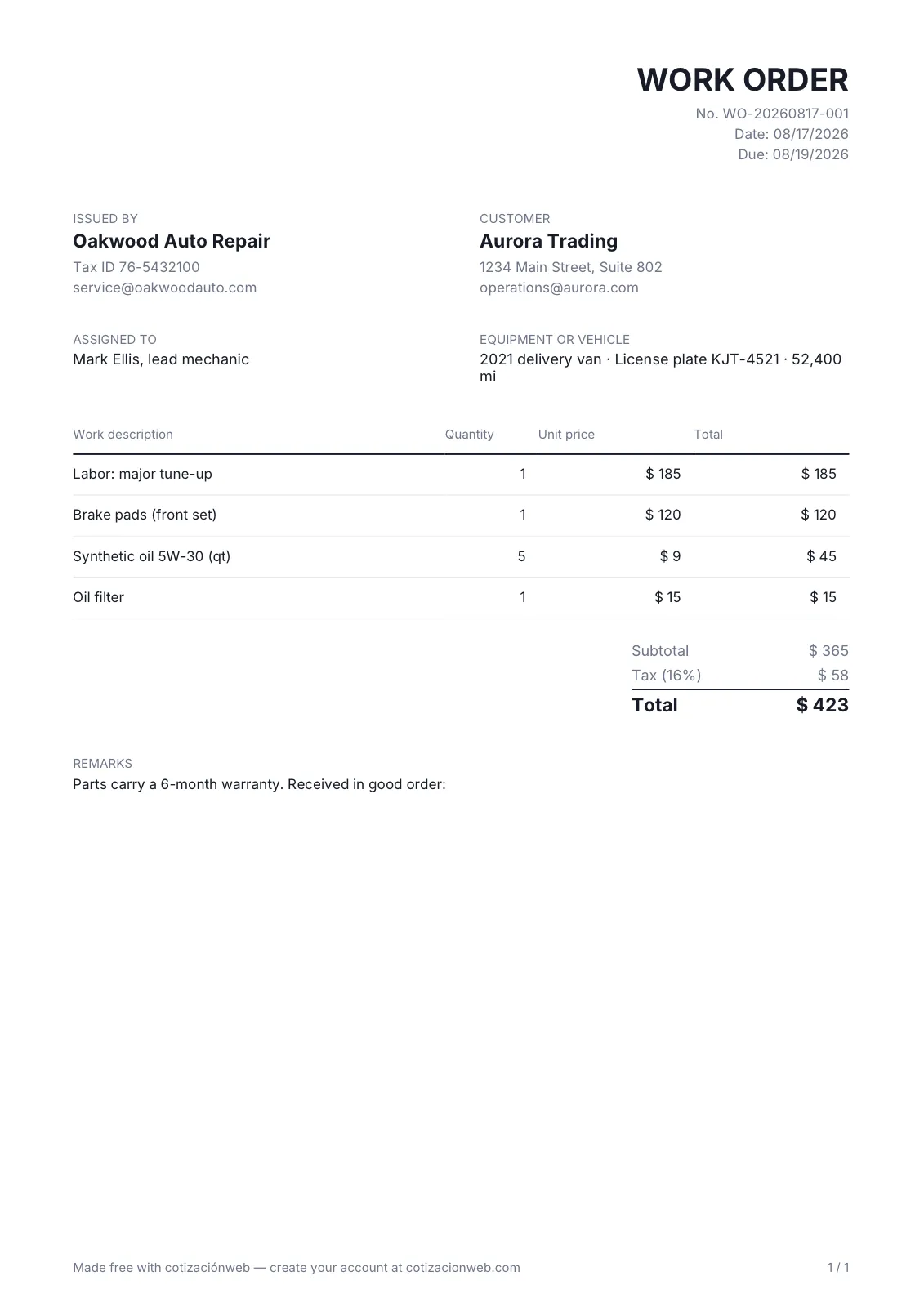
This is the document the tool above generates. Tap any of the four parts to see where it goes on the page.
Oakwood Auto Repair
Tax ID 76-5432100 · service@oakwoodauto.com
Work order No. WO-20260817-001
Issued on August 17, 2026
Customer
Aurora Trading
1234 Main Street, Suite 802 · operations@aurora.com
Assigned to
Mark Ellis
Lead mechanic
Vehicle
2021 delivery van
License plate KJT-4521 · 52,400 mi
| Labor or part | Qty | Price | Subtotal |
|---|---|---|---|
| Labor: major tune-up | 1 | $185 | $185 |
| Brake pads (front set) | 1 | $120 | $120 |
| Synthetic oil 5W-30 (qt) | 5 | $9 | $45 |
| Oil filter | 1 | $15 | $15 |
- Subtotal
- $365
- Tax
- $58
- Total
- $423
Due date
August 19, 2026
Notes
Parts carry a 6-month warranty. Received in good order:
There's no required format, but these four parts are what separate a work order from a sheet of paper with a to-do list.
This is the PDF you download.
An A4 page with your details and the customer's, the vehicle or equipment, who's responsible, the labor and parts, and the total if you added prices. It opens on any phone and prints without adjusting anything.
What a work order is
It's the document you use to get a job done: what needs doing, on which equipment or vehicle, who's responsible for it and by when. It works in two directions at once, and that's where its value lies: internally it's the instruction that stops two people from each assuming the other has the task, and externally it's the record of what was agreed, which the customer signs on delivery.
Don't confuse it with a purchase order. A purchase order goes to a supplier and is for buying something; a work order goes to whoever does the job and is for getting something done. They often live side by side on the same job: one buys the materials and the other sends the crew to install them.
When the work is billed, the order also carries the amounts, so labor and parts end up on the same page the customer signs when they pick up.
Work orders for auto repair shops
It's the most common use of this document, and the most demanding. In a shop the order starts when the vehicle comes in: make, model, license plate and mileage are written down, and that alone identifies the job without anyone having to ask whose white van it was. The tool above asks for those details in the equipment block, so the document goes out with the vehicle written on it and not in the mechanic's memory.
The difference from a to-do list shows up at billing time: labor and parts go line by line on the same order, with their quantities, and the total is worked out right there. The customer sees why they're paying what they pay, which is half the arguments at pickup. If you'd rather estimate before starting work, the quote comes first and the order after, with what the customer approved.
At close-out come the due date, the parts warranty and the sign-off line. That last line is what turns the order into a record: once signed, there aren't two versions of what was authorized and what was done.
Quote, purchase order and work order
They're three documents from the same deal, at three different moments. The quote proposes, the purchase order confirms what's being bought and the work order gets it done. Each one has its own free tool here.
Need more than a PDF?
In cotizaciónweb the work order isn't a standalone module: it comes from the quote your customer accepted and sits alongside the purchase order for the materials. All three documents speak the same language.
It starts from the accepted quote
The work order isn't written from scratch: it comes from the document your customer already approved, with the same items and no retyping.
Where every job stands, without asking
The status of every order in real time, so you know what's pending and what's been delivered without calling the shop.
Your data, protected
Security and privacy best practices on every document and every customer.
FAQ
What is a work order?
It's the document you use to get a job done: it details what needs doing, on which equipment or vehicle, who's responsible and by when. It works as an internal instruction and as a record, for the customer, of what was agreed.
Does it work for an auto repair shop?
Yes, that's the most common use. You can record the vehicle with make, model and license plate, list labor and parts line by line, and bill them on the same order.
Can I issue it without prices?
Yes. If you leave every amount at zero, the document goes out without a totals block and doesn't ask you to pick a currency: it works as an order of tasks and deadlines. As soon as you add a price, the totals appear.
How is it different from a purchase order?
A purchase order goes to a supplier and is for buying something. A work order goes to whoever does the job and is for getting something done. They often live side by side on the same job: the materials are bought with one and the installation is carried out with the other.
Does it work for maintenance work orders?
Yes. It's the same document: instead of a vehicle you identify the equipment or facility by serial number or location, describe the work and the parts, and set the assignee and the committed date. It works for scheduled preventive maintenance as well as for a breakdown that needs attention.
Is there a work order template in Word or Excel?
You don't need to download one: the tool on this page hands you the finished PDF, with your logo, your colors and the totals worked out, with no watermark. A Word or Excel template means fighting with cells and margins every time, and it usually arrives misaligned on the technician's or the customer's phone.
Is the work order generator free?
Yes. You can create and download as many work orders as you need as PDFs, at no cost and without creating an account.
Is my data stored on a server?
No. Everything happens in your browser: your data and the PDF are generated locally and never sent to any server.